If you have a Valley email address, you may have recently received scam emails that looks like they came from us. It can be easy to believe at first glance. These emails are designed to create urgency and panic, and get you to click before you have time to think. These messages are scams — plain and simple — and they are not from Valley Telecommunications.
The good news: once you know what to look for, they’re much easier to spot.
Below are the most common red flags we’re seeing in these scam emails, why they matter, and what a real message from Valley would look like instead.
What To Do If You Receive A Scam Email
If you get an email like the examples shown below (or ones similar to them):
- Do not click any links or buttons.
- If you’re unsure whether something is legitimate, call us directly at 605-437-2615 and we’ll help you confirm it.
- Delete the email.
If you already clicked: don’t panic — just contact us or give us a call. We can help you secure your account and update your password.
Red Flags to Watch For
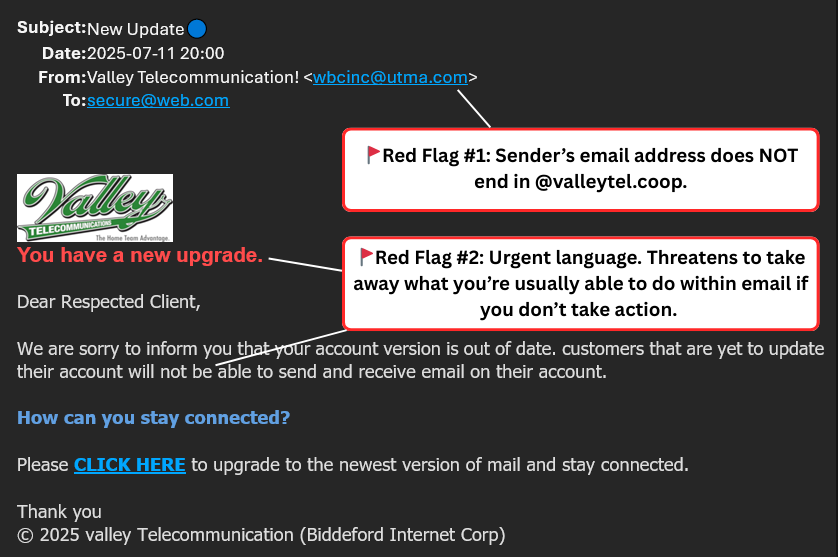
🚩 Red Flag #1: The sender’s email address is not a Valley email address
Scammers can make the sender’s display name look like it’s from us (and even steal our logo to put into the scam email), but the real giveaway is the email address behind it. Sometimes that email address shows right next to the display name (like the yellow highlight below). Other times, you have to look one step deeper.
How to check it (quick tip):
On your phone or computer, tap on the sender’s name to reveal the actual email address attached to the name. (DO NOT click on any links or buttons in the actual email.)
You can see where they tried to create a name that mimics Valley, but the actual email address behind that name is way off base.
Why it’s a red flag:
A display name/sender name can be changed easily. The actual email address attached to the display name tells you where it really came from. We’ve been seeing several of these scam email addresses ending in a Gmail domain or another website that looks nothing like ours.
What Valley would do instead:
Official Valley emails will always come from an address ending in:
@valleytel.coop
What to do:
If the sender’s email address doesn’t end in @valleytel.coop, it is not from us. Delete it.
🚩Red Flag #2: Urgent language meant to scare you into acting fast
Phrases like “Account Authentication Required,” “Update Now,” “your account will be terminated,”, “within 24 hours”, or anything similar are meant to create panic and rush you.
Why it’s a red flag:
Scammers rely on urgency, so you click before you have time to double-check anything.
What Valley would do instead:
We do not send sudden threats that your email will be shut down unless you click a link immediately. If there’s an issue with your account, you can always call us directly and we’ll walk through it with you.
What to do:
Pause and don’t act from the email. Delete it, and give us a call at 605-437-2615 to verify.
Scam Email Example of Red Flag #1 and #2
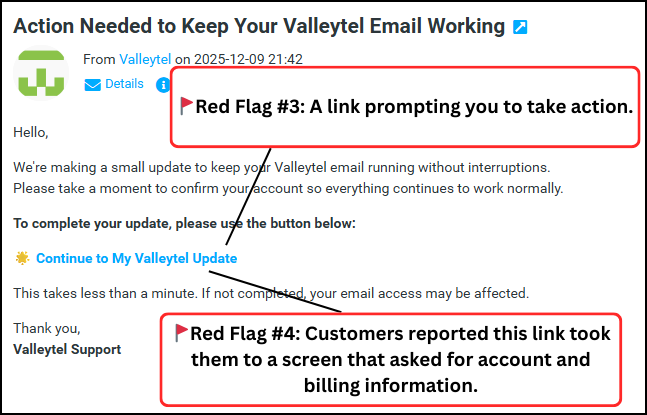
🚩Red Flag #3: It asks you to “authenticate,” “confirm,” “update”, or “restore” your email through a link
A common scam tactic is telling you to “verify your account” or “restore access” by clicking a button or link. “Click here to update” or similar is also a very common one that we see.
Why it’s a red flag:
Those links often lead to fake login pages designed to steal your password (or capture personal information).
What Valley would do instead:
We will not ask you to authenticate or confirm your Valley email by clicking a surprise link in an email. If you ever have questions about your account, call us and we’ll help.
What to do:
Don’t click. If you need to check anything, go directly to the official website/app by yourself outside of the email to see if there’s any legitimate issues or updates you need to address.
🚩Red Flag #4: Requests for billing information or account details
Some scam emails try to push you into entering your billing address, account info, or even payment details.
Why it’s a red flag:
This is a common path to identity theft or payment fraud.
What Valley would do instead:
We will never ask you to enter sensitive billing or payment information through an email link.
What to do:
Never enter personal or billing details from a link in an unexpected email. It’s best to call us directly to handle any payment information. We will likely call you first if a payment doesn’t go through, etc.
Scam Email Example of Red Flag #3 and #4
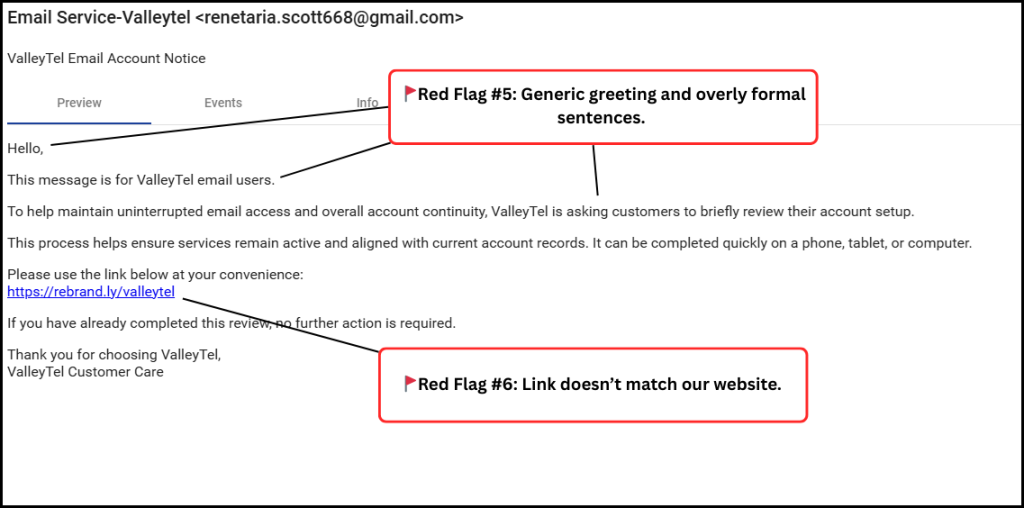
🚩Red Flag #5: The greeting is generic, and the wording feels “off”
The same-sounding scam emails are often sent to thousands of people, and follow a similar template. They may start with “Dear Users” and contain awkward phrasing, unusual formatting, or wording we simply wouldn’t use.
Why it’s a red flag:
Even with today’s tools (including AI), scam messages often sound slightly unnatural or don’t match how a local provider communicates. (Typos USED to be a clear sign of a scam email. With AI, that’s not the case anymore. Scammers can just copy and paste an AI message that spells everything correctly. Odd phrasing and tone are the key things to look for.)
What Valley would do instead:
Our messages are straightforward and consistent, not just something urgent and out of the blue.
What to do:
Treat it as suspicious and delete it. When something feels “off,” trust your gut and verify through a trusted channel, like the Valley webmail login here.
🚩Red Flag #6: The link doesn’t match what the email claims
Even when a link looks official, it may send you somewhere completely different.
Why it’s a red flag:
Scammers often hide their real destination behind a button or link.
What Valley would do instead:
If we direct you to anything online, it will be something you can verify easily — and you can always call to confirm before taking action.
What to do:
Do not click any buttons or links. If you need to reach a website, type the address into your browser yourself.
Scam Email Example of Red Flag #5 and #6
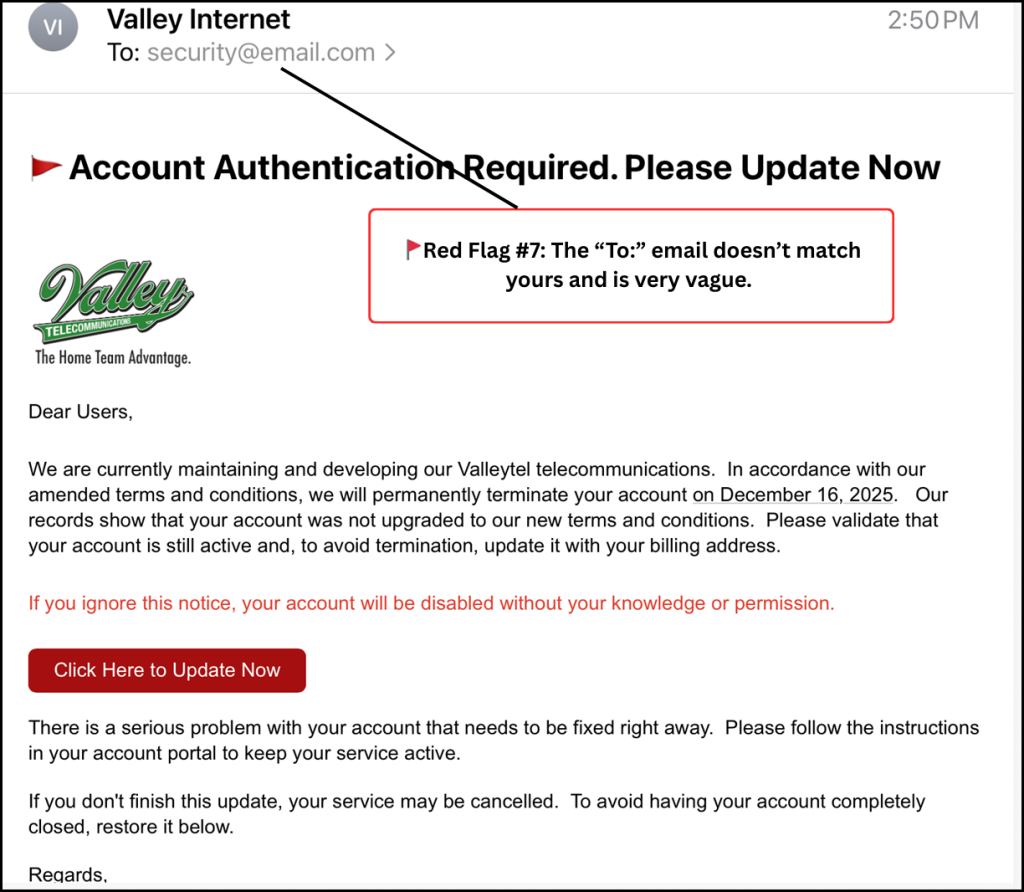
🚩Red Flag #7: The “To:” line looks strange or doesn’t look like it was sent to you
In some scam emails, the “To:” field shows a random-looking email address (or something that just doesn’t make sense). Customers often notice this and wonder why it looks so “off.” (Example: “service@email.com”. The domain address will often be very vague, like this one).
Why it’s a red flag:
The “To:” line you see is part of the email’s visible formatting — and scammers can put almost anything there. Even if you received the message in your inbox, the scammer may use a weird “To:” address as a placeholder while sending the same message to many people behind the scenes.
What Valley would do instead:
A legitimate message from Valley won’t rely on confusing “To:” formatting. It will simply have your name and email after the “To:”.
What you should do:
Consider it one more warning sign. Don’t click anything in the message, and delete it.
Scam Email Example for Red Flag #7
How to know it’s really Valley
Here’s the simplest rule to remember:
✅ Official Valley emails will always come from @valleytel.coop
✅ If you’re ever unsure, call us at 605-427-2615 — we’ll help you confirm whether a message is legitimate.
Your calls actually help us to identify when a scam is going around to our members and customers. If we get multiple calls in a short amount of time about the same odd email, then we know it’s a scam email. We will then likely post to our Facebook page about the scam email to get the word out. Follow us on Facebook for updates like that and more.